
Automated trading systems, commonly known as Expert Advisors (EAs), allow traders to execute strategies in the MetaTrader platform without manual intervention. One such EA that has attracted attention among scalpers is C68-MoneyMagnet Scalping EA.
This article explains how the C68-MoneyMagnet EA works based on an analysis of its source code, focusing on its trading logic, money management system, and risk controls.
Overview of the C68-MoneyMagnet Scalping Strategy
The C68-MoneyMagnet EA is designed as a short-term scalping robot. Its primary objective is to capture small price movements in the market by opening and closing trades quickly.
The core components of the EA include:
- Signal generation logic
- Money management system
- Trade execution module
- Risk control mechanisms
- News Filter (New in v2.2)
These modules interact together to determine when to open a trade, how large the position should be, and when trading should stop.
🧩 1. General Design
The EA is a price-action–based scalper, not indicator-based.
All calculations depend on:
- Raw Bid, Ask, Close, and Time values.
- Several internal functions most likely custom routines for entry, money management, and trade handling.
⚙️ 2. Trade Timing Controls
The EA has conditions checking trading hours. This means:
- Provide a time filter.
Open_HourandClose_Hourdefine start and end hours for trading.- It prevents trades outside that window — typical for scalpers avoiding volatile or illiquid sessions.
- News Filter.
💰 3. Lot Size Management
It calculates and validates lot sizes. So:
- You can use either fixed lots or dynamic lot scaling.
- The code enforces broker minimum/maximum lot limits.
- There might be a Fixed, martingale or lot-multiplier feature through variables.
🔄 4. Entry Logic (Buy/Sell Triggers)
Entries seem to depend on price distance checks rather than indicators, such as:
- reference prices (previous order prices, or levels).
- a minimum distance (in pips) before another trade can open.
- variables control whether buy or sell trades are active.
- a flag meaning “ready to open a new position.”
Then, when conditions are met: it calls a function f_Buy(OP_BUY) or f_Sell(OP_SELL) — meaning:
👉 f_OrderSend() is the actual function that sends trades.
📉 5. Equity & Risk Protection
There’s an equity stop mechanism:
UseEquityStopactivates a check on drawdown.- If the loss exceeds a percentage of total equity, the EA will stop trading or close open positions.
TotalEquityRiskdefines the maximum tolerable drawdown (in %).
🧠 6. Trade Management
It performs:
- Order closing via
OrderClose(). - Possibly partial closures or martingale follow-ups using counters (
f_countTradescounts open trades). - Stoploss/takeprofit levels are adjusted dynamically through
OrderModify()calls.
So, there’s a combination of:
- Trade option Grid-like or martingale averaging (multiple trades).
- Trailing or time-based exits.
- Equity protection to limit loss.
🧾 7. Summary of Indicators and Core Logic
| Type | Description |
|---|---|
| Indicators Used | Price Action or time logic |
| Entry Triggers | Price movement or distance-based triggers (Ask/Bid distance vs stored levels) |
| Filters | Time of day, spread check, max trades, trade position, News |
| Money Management | Fixed or dynamic lot sizing, broker limit check, optional martingale |
| Risk Management | Take Profit, Stop Loss, Equity stop (%), trading hour control |
| Trade Handling | Multiple orders (scaling in/out), trailing stop, close on equity drawdown |
Source Code Snippet
//+------------------------------------------------------------------+
//|                                              C68-MoneyMagnet.mq4 |
//|                                      Copyright 2026, Troi-Z Tech |
//|                                               https://troi-z.com |
//+------------------------------------------------------------------+
#property copyright "Copyright 2025-2026, Troi-Z Tech"
#property link      "https://troi-z.com"
#property version   "2.2"
#property strict
#property icon "\\Images\\Logo_3Z_icon.ico"

//v2.1:
// + Add StopLoss
// + Add Equity Cut Loss

//v2.2:
// + News Filter
// + Add Display on Terminal
// + Operation hours session #2

#import "kernel32.dll"
int SetFileAttributesW(string lpFileName, int dwFileAttributes);
#import

#define POINT_FORMAT_RULES "0.001=0.01,0.00001=0.0001,0.000001=0.0001" // this is deserialized in a special function later
#define ENABLE_SPREAD_METER true
#define ENABLE_STATUS true
#define ENABLE_TEST_INDICATORS true

//-Events On/Off
#define ENABLE_EVENT_TICK 1 // enable "Tick" event
#define ENABLE_EVENT_TRADE 0 // enable "Trade" event
#define ENABLE_EVENT_TIMER 0 // enable "Timer" event
//--
//...
// --- cut off
//...
//--------------- INPUTS: user-configurable -----------------
sinput string Trade_Manag = "***TRADE MANAGEMENT***";    // MONEY & RISK MANAGEMENT
extern int         slippage = 3;                          // Slippage
extern int         MaxSpread = 0;                         // Max Spread (Unused=0)
extern TypeOP OPType = 0;                                // Trade Position?
extern bool LotConst_or_not = TRUE;                      // Lot Options. TRUE = Fixed, FALSE = Account Balance
extern double Lot = 0.01;                                // * If TRUE, Lot Size
extern double RiskPercent = 10.0;                        // * If FALSE, Risk Percent
sinput string Marti_Opt = " Turn on/off Martingale,  1 = ON. or 2 = OFF."; // Martingal Option
extern double LotMultiplikator = 1.667;                  // * If ON. Lot Multiplier
extern int MMType = 2;                                   // * If OFF. 0 = Fixed Lot, 1 = Martingal, 2 = Adaptive
extern double TakeProfit = 30.0;                          // Take Profit (in pips)
extern double StopLoss  = 30.0;                           // Stop Loss (in pips)
extern double Step = 10.0;                               // Distance between orders
extern int MaxTrades = 15;                               // Max Number of trades
//Add Equity Cut Loss                                    // Cut Loss Options
extern bool UseEquityStop = FALSE;                       // Use Equity Stop Loss ?
extern double TotalEquityRisk = 10.0;                    // * Total(%)Equity Risk
sinput string S1 = " Operation Hour Session #1";         // Schedule #1
extern int Open_Hour = 17;                               // * Start Hour
extern int Close_Hour = 21;                              // * End Hour
sinput string S1_2 = " Operation Hour Session #2 ";      // Schedule #2
extern int Open_Hour_2 = 1;                               // * Start Hour
extern int Close_Hour_2 = 5;                              // * End Hour
extern bool TradeOnFriday = FALSE;                       // Trade on Friday?
extern int Friday_Hour = 15;                             // * If TRUE, Friday Hour

sinput string     Filter_News = "*** N E W S ***";                // NEWS FILTER SETTING
input bool        use_News_Filter = false;                     // Use News Filter?
input TypeNS      SourceNews = 1;                              // Source News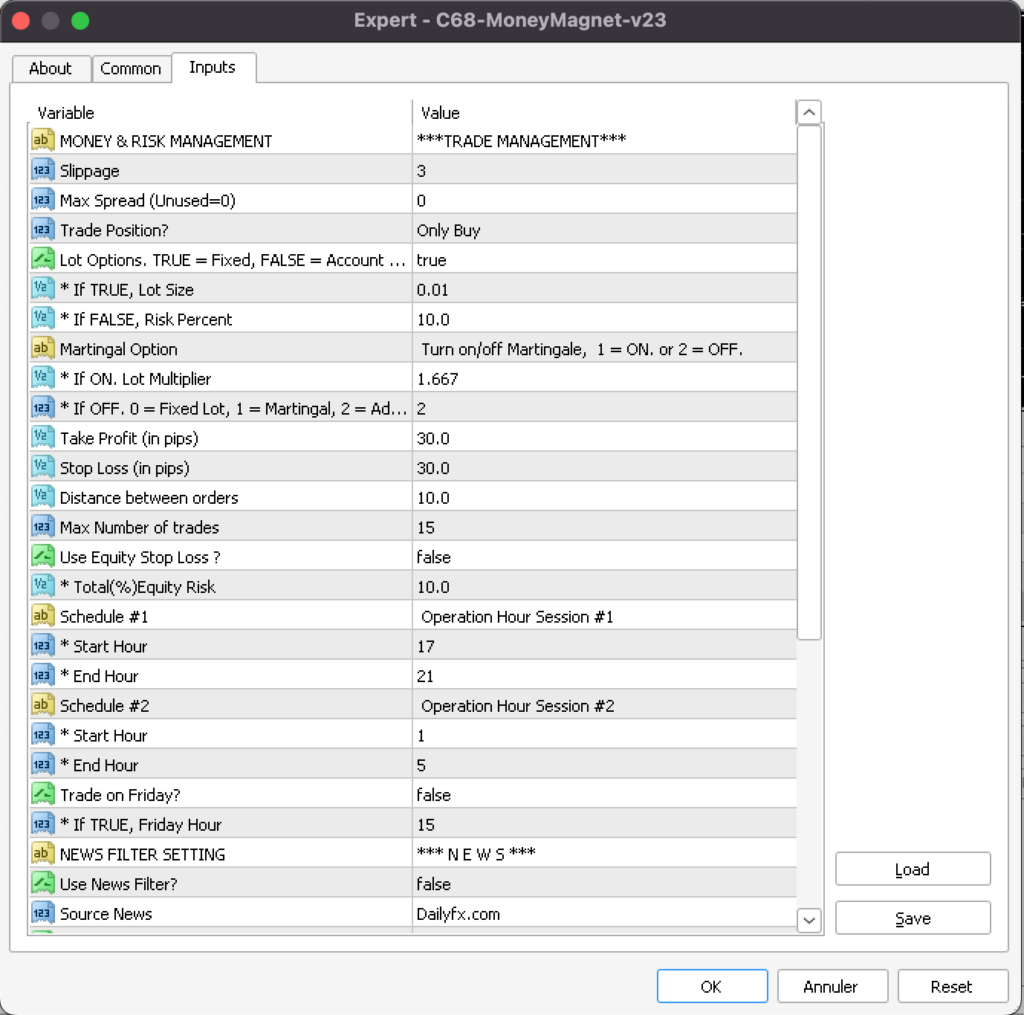
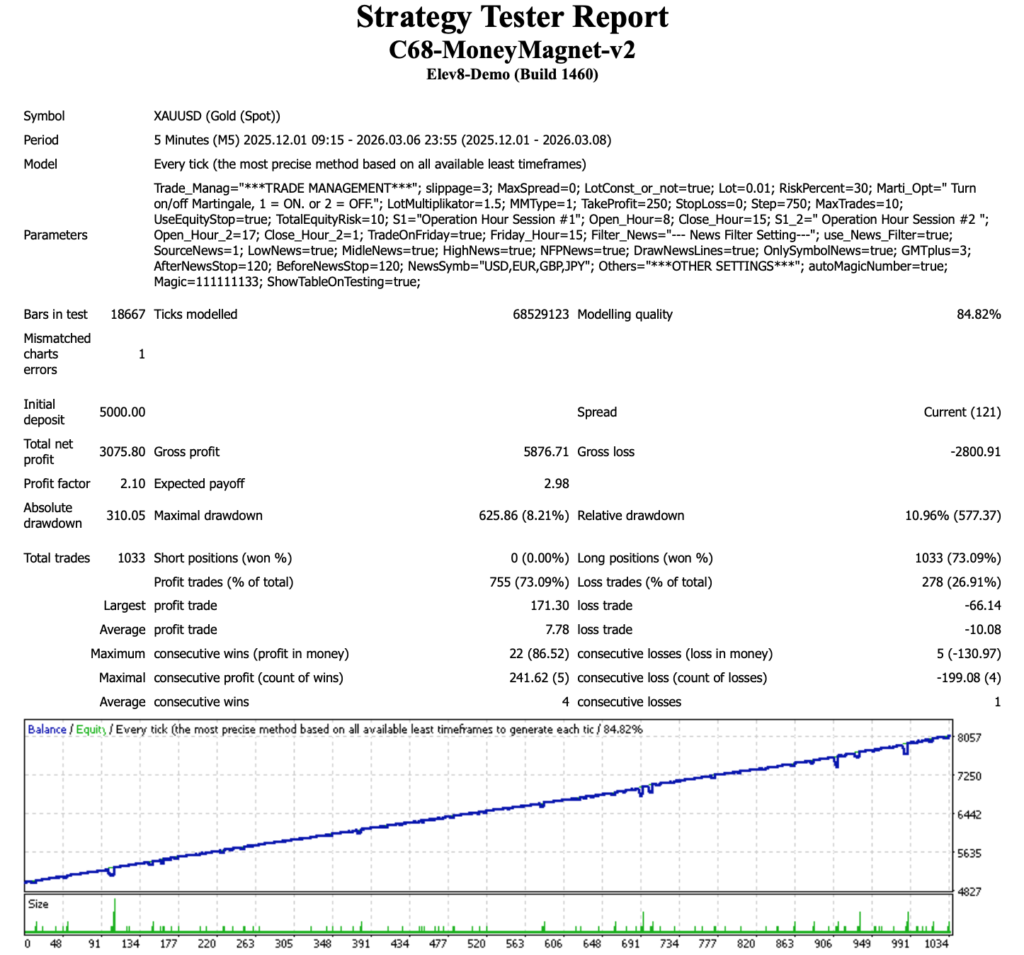
Backtest Results
Disclaimer
The information contained in my Scripts/Ideas/Algos/Systems does not constitute financial advice or a solicitation to buy or sell any securities of any type. I will not accept liability for any loss or damage, including without limitation any loss of profit, which may arise directly or indirectly from the use of or reliance on such information.
All investments involve risk, and the past performance of a security, industry, sector, market, financial product, trading strategy, backtest, or individual’s trading does not guarantee future results or returns. Investors are fully responsible for any investment decisions they make. Such decisions should be based solely on an evaluation of their financial circumstances, investment objectives, risk tolerance, and liquidity needs.
My Scripts/Ideas/Algos/Systems are only for educational purposes! USE AT YOUR OWN RISK!!!
Nirvana on Earth, March 08, 2026